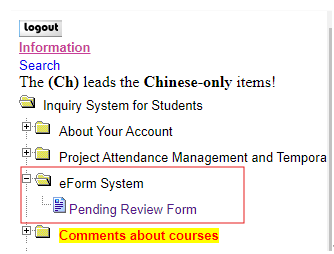
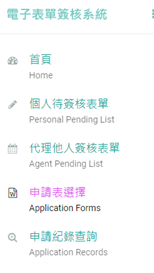
Please click on the top right corner of the screen "En" to switch to English version
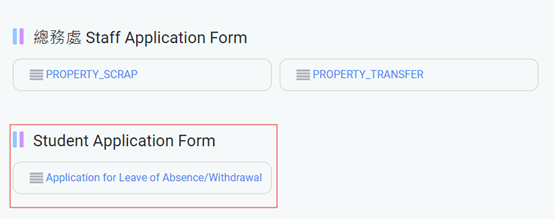
Then you could see the "Application for leave of Absence"
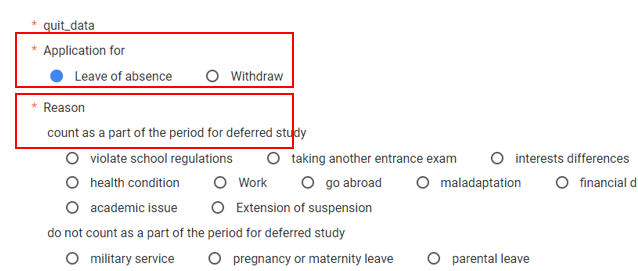
Please select “Leave of absence” and check the reason.
Set the period of leave of absencethat you want to apply and the Re-Entry date below will automatically appear below.(The image is for reference only; please select the actual application period.) Select From(start) and For(end). The “Re-Entry Date “will be shown. Please confirm it.
*Spring semester: from Feb. 1st this year to July 31st this year. *Fall semester:from August 1st this year to Jan. 31st next year.
*In accordance with Article 38 of the Academic Regulations: Students deferred study may be allowed for up to 2 years (4 semesters). The school reserves the right to modify the application process.
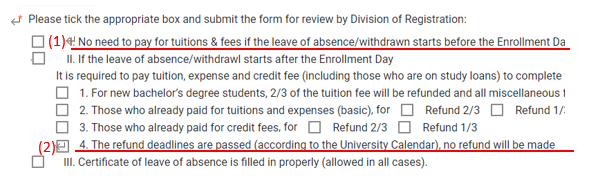
Then tick the box of the status of registration:
(1).If you apply before the end of the Enrollment Date,please tick the box: I.No need to pay for the tuitions & fees if the absence before the Enrollment Date.
(2).If you apply after the end of the Enrollment Date,please tick the box:II. If the leave of absence starts after the enrollment date --> 4. The refund deadlinesare passed (according to the University Calendar) No refund will be made.
* The end of the Enrollment Date is subject to the notification from the office of the master program.
Please upload your payment confirmation proof if you apply for leave after the end of Enrollment Date:
*The payment confirmation proof will be sent via email. Please check with the office of the master program if you don't receive one.
**There is no need to upload if you apply for leave before the end of Enrollment Date
Please click "SEND APPLICATION" to finish the process of application.