eForm Instructions for Application for Leave of Absence
- Please log in the Academic Information Systems :https://www.ccxp.nthu.edu.tw/ccxp/INQUIRE/index.php?lang=english
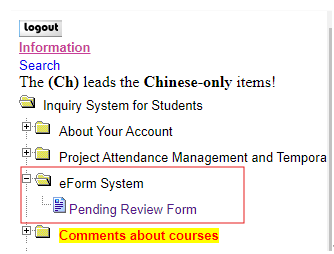
- Then click "eForm System"=>"Pending Review Form"
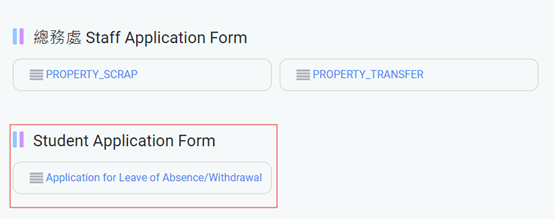
- Choose“Application forms"

- Please click on the top right corner of the screen "En" to switch to English version

- Then you could see the "Application for leave of Absence"
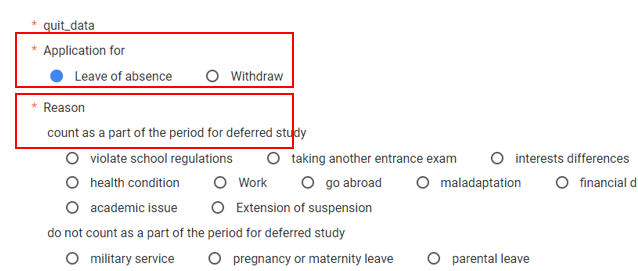
- Please select “Leave of absence” and check the reason.
- Set the period of leave of absence that you want to apply and the Re-Entry date below will automatically appear below.( The image is for reference only; please select the actual application period.)
Select From(start) and For(end). The “Re-Entry Date “will be shown. Please confirm it.
*Spring semester: from Feb. 1st this year to July 31st this year.
*Fall semester:from August 1st this year to Jan. 31st next year.

*In accordance with Article 38 of the Academic Regulations: Students deferred study may be allowed for up to 2 years (4 semesters). The school reserves the right to modify the application process.
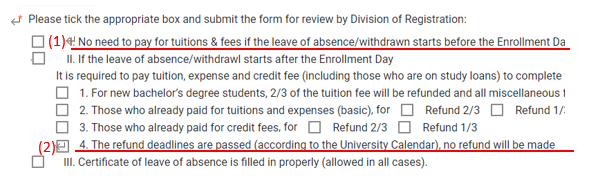
- Then tick the box of the status of registration:
(1).If you apply before the end of the Enrollment Date,please tick the box: I.No need to pay for the tuitions & fees if the absence before the Enrollment Date.
(2).If you apply after the end of the Enrollment Date,please tick the box:II. If the leave of absence starts after the enrollment date --> 4. The refund deadlinesare passed (according to the University Calendar) No refund will be made.
* The end of the Enrollment Date is subject to the notification from the office of the master program.
- Please upload your payment confirmation proof if you apply for leave after the end of Enrollment Date:
*The payment confirmation proof will be sent via email. Please check with the office of the master program if you don't receive one.
**There is no need to upload if you apply for leave before the end of Enrollment Date

- Please click "SEND APPLICATION" to finish the process of application.